M5C Printer Z-Axis Homing Failure Troubleshooting
Step 1: Remove the Bottom Cover Plate
- Check the Z-axis Motor Wire:
- Ensure the Z-axis motor wire is not loose.
- Check for any damage to the motor cable.
- If everything appears normal, unplug and replug the motor wire, then run the Z-axis again to see if it functions properly.


Step 2: Inspect the Z-axis Wire Rod and Coupling
- Check for Disconnection or Looseness:
- Verify if the Z-axis wire rod and coupling have come out of the slot where the Z-axis does not move.
- Manually move the Z-axis to check for any looseness.
- If loose, proceed with the following steps:

Disassemble:
- Pull out the Z-axis motor wire.
- Remove the 8 Z-axis fixing bolts and take out the gantry assembly from the base.

Remove the bottom cover plate of the Z-axis.
Move the Z-axis wire rod down to expose the coupling.
Re-secure the fixing screws at the coupling.
Check if the motor or wire rod is loose; if so, tighten the screws again.
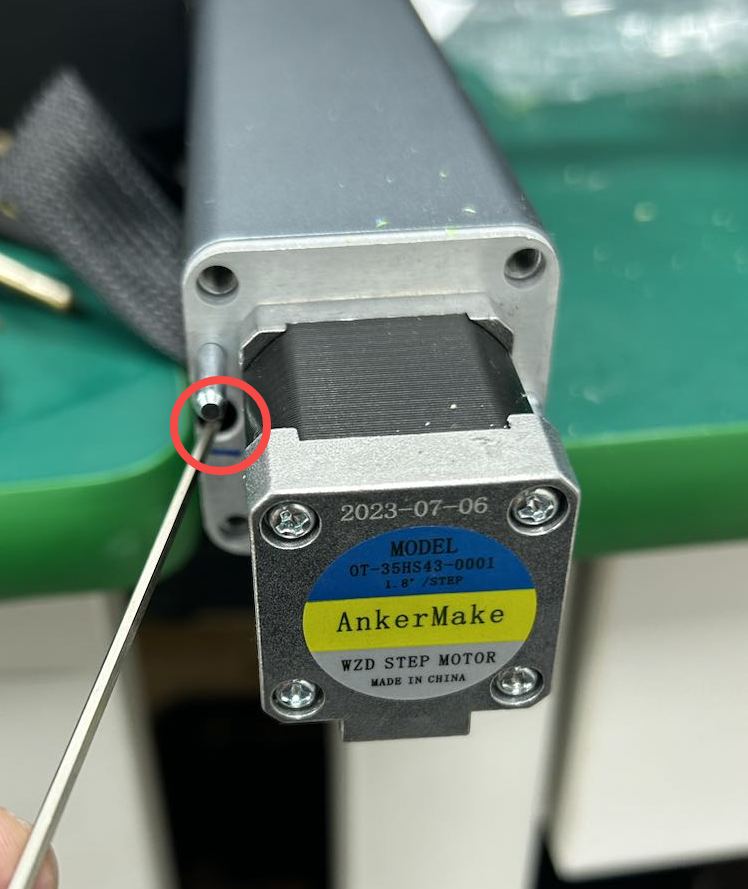


- Reassemble:
- After fixing it, reassemble it in the reverse order of disassembly.
Step 3: Check for Motor Damage
- If issues persist: It is possible that the motor is damaged and may need replacement.
Step 4: Contact Support
- For further assistance: If the above steps do not resolve the issue, please contact us at us.


96 undefined
AnkerMake 3D Printer Maintenance (Lubrication)


How to Replace the X-axis Belt of M5C
How to adjust X/Y axis belts on the M5C
How to Adjust the V Wheel of X and Y Axis
How to clean the M5C printer
How to Replace the V Wheel of X Axis of M5C
How to Replace the Y-axis Belt of M5C
How to Replace the V Wheel of the Y-Axis for the M5C Printer
How to Fix Loose Threaded Rods on the M5C

M5C X Axis Belt Adjuster.gcode
Ankermake Studio Guide(V1.5.21)
M5C Y axis belt adjuster.gcode
V8110 AnkerMake M5C EU Declaration of Conformity
V8110_UK Declaration of Conformity
M5C Y Axis Belt Adjuster.gcode
View More


How to Replace the Air Guide of the Print Model Fan

How to Replace the Print Model Fan

Auto Leveling

V Wheel Adjustment

How to Transfer Files and Start Printing

Loading Filament
View More


