Operating Modes
The Purifier P1 offers three manual modes and one automatic mode:
-
Silent mode: Suitable for standby or nighttime use; noise level ≤ 45 dB.
-
Standard mode: Suitable for flat (planar) printing scenarios.
-
High mode: Suitable for high-intensity scenarios such as embossed printing.
-
Auto mode: Links with the printer to automatically switch modes and start or stop with print jobs.
Switching Modes
-
Silent, Standard, and High modes: Can be switched using the on-device button, the app, or the desktop software.
-
Auto mode: Must be enabled in the software after connecting the purifier. It cannot be enabled using the on-device button.
On-Device Buttons
Auto Mode
After Auto mode is enabled in the software, the Purifier P1 links with the printer and automatically switches operating modes based on the print job.
In Auto mode, the purifier automatically turns on and enters standby with print jobs, helping to prevent missed filtration or unnecessary idle operation. You can also set a delayed shutdown time in the software. After printing is complete and the device enters the delayed shutdown phase, it switches to Silent mode.
Note: The Purifier P1 does not have an air quality sensor. Auto mode adjusts the operating mode based on the printer's printing status rather than detecting air quality.
Filter Lifespan
Filter lifespan varies by mode, with the longest lifespan in Silent mode and the shortest in High mode. Actual filter life varies depending on usage intensity. Refer to the remaining filter life shown in the app.
Filter Life & Replacement
Filter life is displayed in real time in the app as a percentage or number of remaining days and is automatically synced through smart recognition.
-
≥ 16%: The indicator light remains solid green.
-
1%–15%: The indicator light breathes yellow, reminding you to prepare a replacement filter.
-
0%: The indicator light turns solid red, indicating that the filter must be replaced.
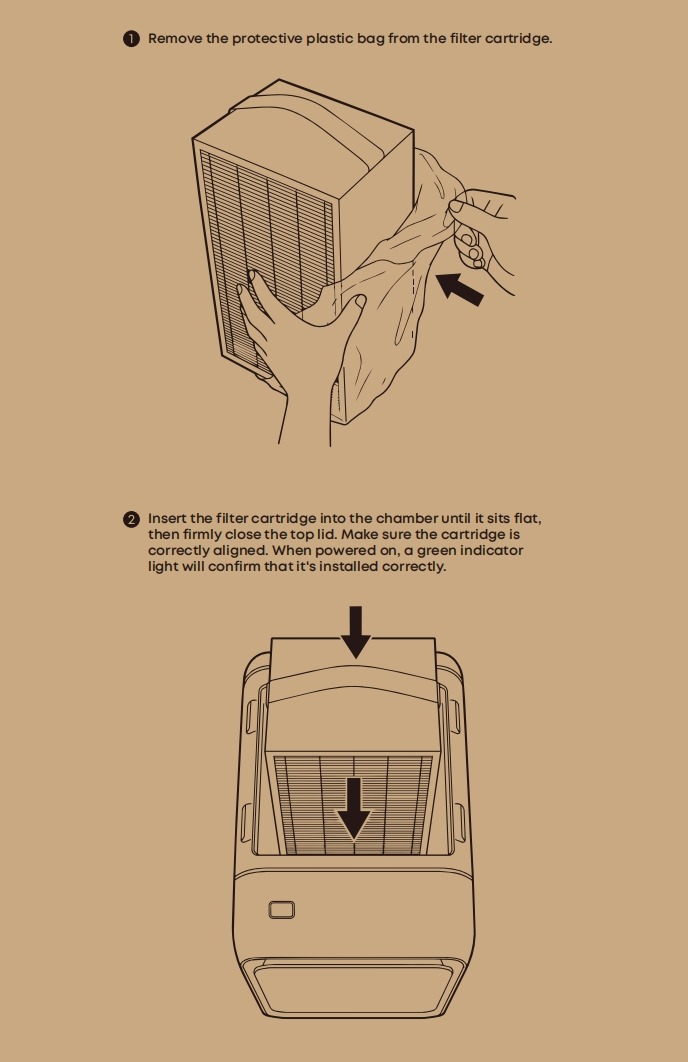
Replacement Steps
-
Remove the old filter.
-
Insert the new filter following the direction indicator.
-
Once the new filter is inserted, it is automatically recognized and the new filter life is displayed.
FAQs
Q: How do I turn on Auto mode?
Connect the purifier and enable Auto mode in the software. Auto mode cannot be enabled using the on-device button. Once enabled, it links with the printer to automatically switch modes and start or stop with print jobs.
Q: How long does the filter last in different modes?
The filter lasts approximately 1,700 hours in Silent mode, 540 hours in Standard mode, and 300 hours in High mode. Refer to the remaining filter life shown in the app.
Q: When should I replace the filter?
Replace the filter when its remaining life reaches 0%, indicated by a solid red indicator light. After installing a new filter, it is automatically recognized and the new filter life is displayed. No manual reset is required.


